Set up the environment
This is the only setup step. One command provisions the entire Aetherion AirOps platform on Azure, then hands you straight to Challenge 1.
This environment costs money until you delete it
You are provisioning a real, running estate: AKS, API Management, PostgreSQL,
Managed Grafana and continuous load. It bills for as long as it exists.
Run ./scripts/99-teardown.ps1 when you finish — that is the single
biggest cost saver, and re-provisioning later takes one command.
1. Install the required tools (Windows)
Setup is written for Windows. The scripts are PowerShell 7, so macOS and Linux
need pwsh installed and the winget step replaced with your own package manager.
| Tool | Minimum version | Notes |
|---|---|---|
| PowerShell | 7.0 | required |
| Azure CLI | 2.60 | required |
| kubectl | any recent | required |
| Git | any recent | required |
GitHub CLI (gh) |
any recent | optional, but the steps below and Challenge 8 give gh one-liners, and the Challenge 8 grader uses it to confirm your work instead of asking you |
winget install --id Microsoft.PowerShell --exact --accept-source-agreements --accept-package-agreements
winget install --id Microsoft.AzureCLI --exact --accept-source-agreements --accept-package-agreements
winget install --id Kubernetes.kubectl --exact --accept-source-agreements --accept-package-agreements
winget install --id Git.Git --exact --accept-source-agreements --accept-package-agreements
winget install --id GitHub.cli --exact --accept-source-agreements --accept-package-agreements
After installs complete, restart your terminal so the commands are available on
PATH, and sign in to the GitHub CLI once with gh auth login.
Run every command in PowerShell 7 (pwsh)
Windows PowerShell 5.1 is the default on Windows and is not supported: the
scripts stop with a version error. Start your session with pwsh and confirm
with $PSVersionTable.PSVersion (must be 7.0 or later).
2. Get the two repositories
You use two repositories in this MicroHack. Keeping them straight matters: one drives the hack, the other is the "production" application the agent investigates.
| What it is | You get it by | Used for | |
|---|---|---|---|
| Lab clone | This workshop: challenges, scripts, runbooks, the subagent and skill files | git clone |
Running start-challenge / check-challenge, and the knowledge/ files in Challenge 4 |
| Your app repo | The Aetherion AirOps application source | Use this template | The repo you connect the SRE Agent to, and the one it writes to in Challenge 8 |
a) Clone the lab repo. It drives the hack (challenges + scripts):
git clone https://github.com/abengtss-max/azure-sre-agent-microhack.git
cd azure-sre-agent-microhack
b) Create your own copy of the application repo. This is the Aetherion AirOps application source that the Azure SRE Agent connects to for change correlation. It is a template repository, so you get your own standalone copy in one click:
- Open https://github.com/abengtss-max/aetherion-airops-platform
- Click Use this template → Create a new repository.
- Choose your own account as the owner, keep the name
aetherion-airops-platform, and create it.
It is created private, which is correct — leave it that way. The agent reads it through the Code Access connection you make in Challenge 1, not anonymously.
You'll connect the SRE Agent to your copy in Challenge 1.
Why a template and not a fork
A fork would work, but GitHub turns Issues off on every new fork and Challenge 8 has the agent file the incident RCA as an issue. A template copy arrives with Issues already enabled, so that failure never happens.
Creating it under your personal account also avoids the token-approval step in c) below.
The copy starts with a single commit rather than the upstream history. Nothing in the hack depends on that history: Challenge 3 correlates change from the Kubernetes rollout history, and reads the repo only to answer "what does the manifest declare".
c) Create a GitHub Personal Access Token now. Challenge 8 has the agent write back to your repo — it files the incident RCA as an issue and opens a pull request — and the GitHub MCP connector it uses for that accepts a PAT only. There is no OAuth option on that connector.
Go straight to github.com/settings/personal-access-tokens/new (Settings → Developer settings → Personal access tokens → Fine-grained tokens) and fill it in like this:
| Field | Set it to |
|---|---|
| Token name | aetherion-microhack |
| Expiration | Custom → tomorrow's date. The token only has to outlive today |
| Resource owner | your own account |
| Repository access | Only select repositories → aetherion-airops-platform |
| Repository permissions → Contents | Read and write — create a branch and commit |
| Repository permissions → Pull requests | Read and write — open the PR |
| Repository permissions → Issues | Read and write — file the RCA |
Click Generate token and copy it now — GitHub shows it once. Keep it in your password manager until Challenge 8.
Prefer a classic token? github.com/settings/tokens/new
with the top-level repo scope works too.
3. Check you have access
- Azure subscription with Owner (or Contributor + User Access Administrator). The provisioner deploys infrastructure and assigns the agent's managed identity.
- This repository cloned locally and opened in VS Code.
4. Run one command
That's it. It provisions everything, then opens the Operations Center, Grafana and the resource group in your browser.
Each run creates a uniquely named resource group,
rg-aetherion-microhack-<suffix>, in swedencentral. The script prints the
exact name when it finishes — note it down, you need it in Challenge 1 to scope
the agent.
It takes around 20 minutes. Use them.
Leave it running and read Meet Aetherion while it deploys — who you are, what the airline does, and who you'll be working with. You'll arrive at Challenge 1 knowing what you're looking at.
What the script does, and how to change it
Steps: preflight → deploy infrastructure → build & push images → deploy the app → validate.
Safe to re-run if a step fails: it resolves the cluster's current Kubernetes version rather than forcing a downgrade, and the network configuration is declared explicitly so a re-run cannot reset it.
Unique names mean no collisions, so several attendees can share one subscription and you can re-provision without clashing with an earlier run.
Overrides — the unique suffix is always appended:
The Kubernetes version is resolved from Azure, not guessed
The provisioner asks Azure for the region's current stable (default) GA version at run time and deploys that, so the lab never carries a literal that quietly ages out of support. Nothing to configure, and nothing to keep up to date.
Pin one only if you have a reason to:
Left unset on a re-run, it also follows a cluster that has already auto-upgraded, because a redeploy cannot downgrade a running cluster.
Re-provisioning leaves the previous environment running
Because each run creates a new suffixed resource group, re-provisioning
does not replace your earlier environment. The previous one keeps running
(and billing), and a stray copy can confuse the agent if you scope it to the
wrong one. If you re-provision, either reuse the environment you already have,
or tear down the old ones. The teardown script lists every
rg-aetherion-microhack-* environment (each with its paired -loadgen group)
and lets you pick which to delete:
./scripts/99-teardown.ps1        # pick an environment to delete
./scripts/99-teardown.ps1 -All   # delete all lab environments
Always scope the Azure SRE Agent to your current resource group, using the name the provisioner printed when it finished.
5. What gets deployed
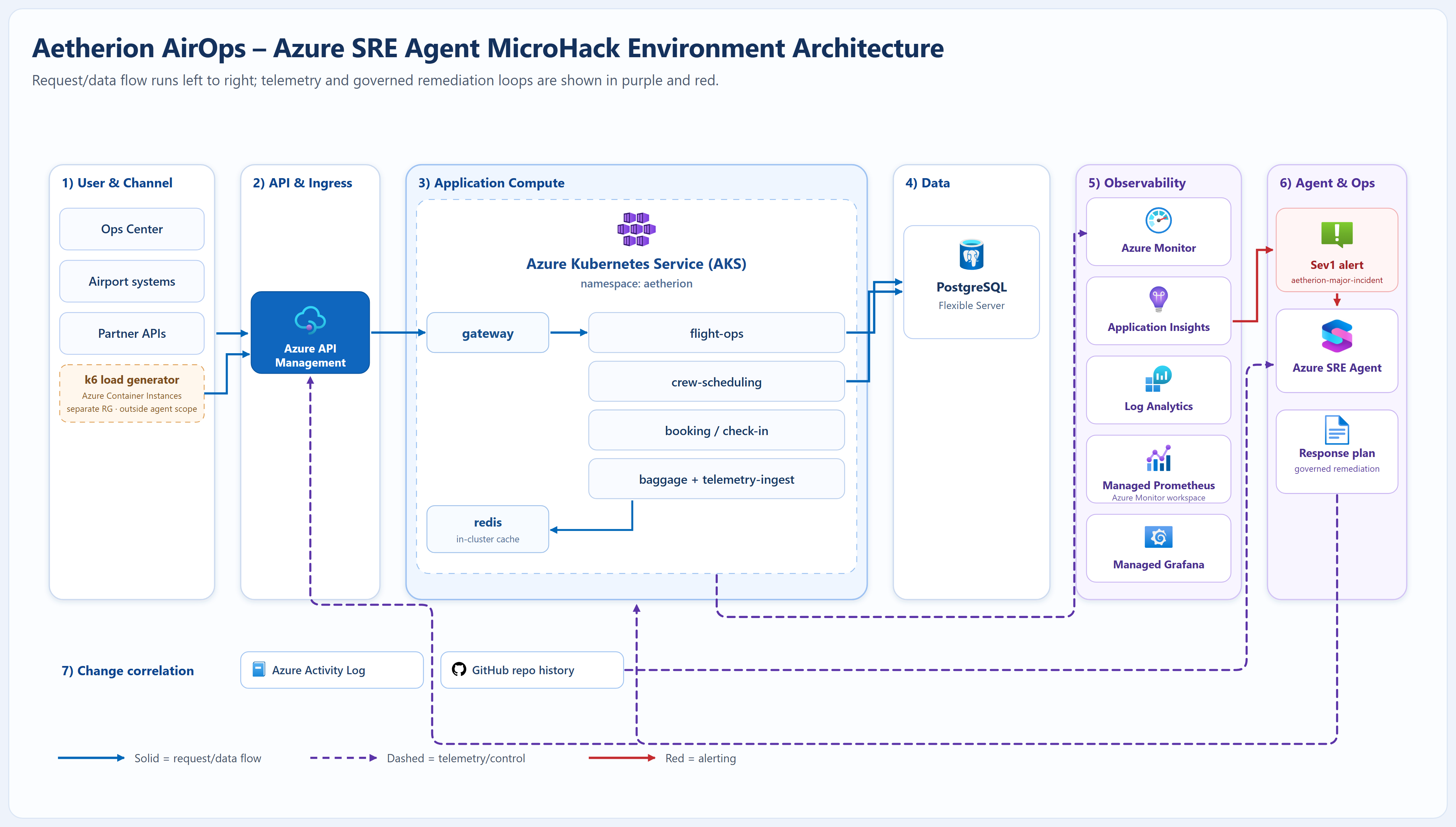
Request/data flow runs left to right (solid blue); telemetry and control flow to observability and the Azure SRE Agent (dashed purple); alerting is shown in red. Click the diagram to open it full size. See the full architecture reference for the deep dive.
| Layer | Resources |
|---|---|
| Edge | Azure API Management (subscription-key auth, rate limiting) |
| Compute | AKS cluster aetherion-aks, namespace aetherion: 6 microservices + in-cluster Redis cache |
| Data | Azure Database for PostgreSQL Flexible Server · in-cluster Redis cache |
| Observability | Application Insights aetherion-appi · Log Analytics aetherion-law · Azure Managed Grafana |
| Agent | Azure SRE Agent aetherion-sre-agent |
6. Confirm it's healthy, then start
When the script finishes it prints a validation summary. You're ready when it reports a healthy, traffic-generating estate and the Operations Center loads with all tiles green.
Re-run the check on its own at any time:
What each component is for (reference)
| Component | Purpose | Where |
|---|---|---|
| Operations Center GUI | Live service health, risk gauge, flight map, incidents, business impact | https://sreagenthack-XXXXX.<region>.cloudapp.azure.com/ |
| API front door | Partner/mobile entry point, subscription-key auth, rate limiting | <apim-gateway-url>/aetherion/api/status |
| PostgreSQL database | System of record for bookings, crews, and telemetry writes | Azure Database for PostgreSQL Flexible Server |
| Redis cache | Low-latency cache for booking/check-in read patterns | In-cluster redis container in AKS |
| Dashboards | Metrics, traces, log visualizations | Azure Managed Grafana |
| App telemetry | Requests, dependencies, exceptions, app map | Application Insights aetherion-appi |
| Logs | Container and node logs/metrics | Log Analytics aetherion-law |
| Compute | All microservices | AKS aetherion-aks, namespace aetherion |
| Load generator | Produces synthetic traffic during the workshop | Azure Container Instance in a separate resource group (not monitored by the agent) |
| Change history | Resource and deployment changes | Azure Activity Log + GitHub repo |
| Azure SRE Agent | Investigate, plan, and remediate with approval or bounded autonomy | Azure portal → aetherion-sre-agent |
Microservices: gateway, flight-ops, crew-scheduling, booking, baggage,
telemetry-ingest. Synthetic workshop traffic is generated externally by the load
generator (see the table above).